

Access Cards
An access card is a physical credential - typically an RFID card or fob - that a user presents to an access reader to unlock a controlled location. Supracontrol stores the card’s identifier and code, which the reader uses to verify the user’s identity when they badge in.
Each user can have up to four access cards linked to their account, which is useful when issuing a backup card or supporting different card formats across locations.
Credential fields
| Field | Description |
|---|---|
| Type | The credential type: Card (RFID card or fob) or PIN (numeric code entered at the reader) |
| Access ID | The identifier value the reader sends when the credential is used. Must exactly match what the reader reports for access to be granted |
Adding a card to a user
Open the user’s edit dialog
In the Users tab, click the edit action (pencil icon) on the user you want to assign a card to.
Go to the Access ID tab
Click the ACCESS ID tab at the top of the dialog.
Enter the credential details
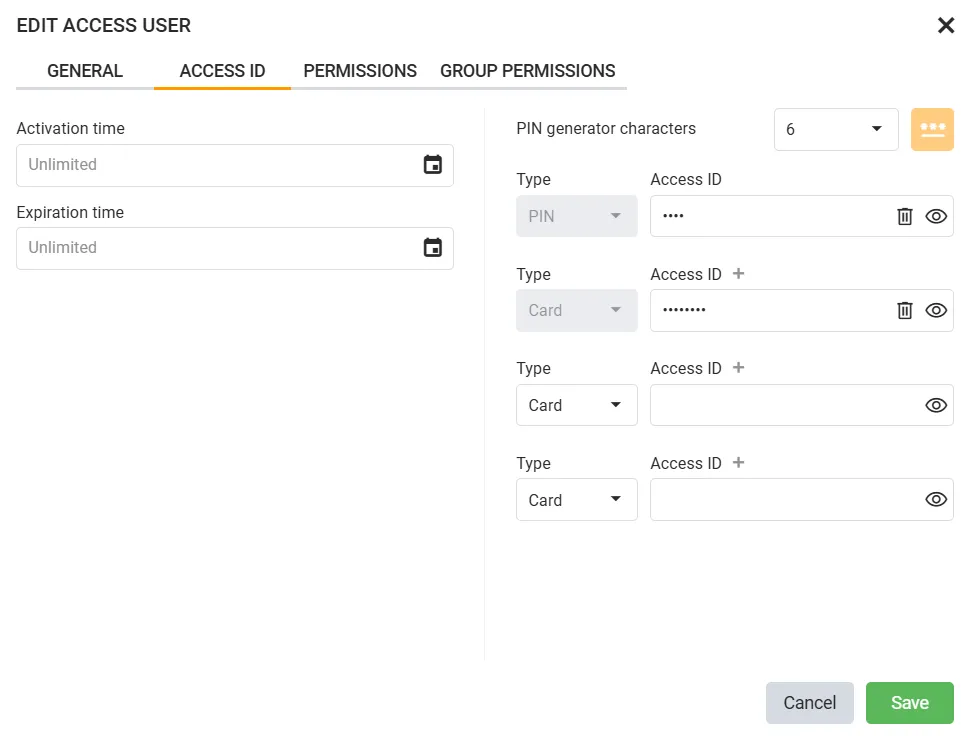
For each credential slot, set the Type (Card or PIN) and enter the Access ID value. Up to four credentials can be assigned per user.
You can also optionally set Activation time and Expiration time to restrict when the credentials are valid.
Use the PIN generator button to automatically create a secure PIN for PIN-type credentials.
Save
Click Save. The credential is immediately active - the user can badge in at any reader connected to their assigned locations.
Removing a card
Open the user’s edit dialog, go to the ACCESS ID tab, clear the Access ID field for the credential to remove, and click Save. The credential is deactivated immediately.